
Remote MCP server with Postgres tools
Put an MCP server on a public HTTPS URL as a Volcano function, with bookmark tools in Postgres behind a bearer token, and call it from Insomnia or Claude Code.
Tested on Volcano CLI 0.54.0, SDK 2.2.0, Node 24.9.0, @modelcontextprotocol/sdk 1.32.2, zod 4.6.7; last verified 2026-10-30 on CLI 0.54.0.
What it does
Your coding agent can call your own tools over MCP, but a server on localhost only works on your laptop, and only while it's running. This puts a small MCP server on a public HTTPS URL as a Volcano function: three tools that save, search and delete bookmarks in the project's Postgres, behind a bearer token. Any client that speaks MCP over Streamable HTTP can connect, including Insomnia and Claude Code.
What you need
- A Volcano account (sign up).
- Claude Code, Codex or Cursor with the Volcano skills (
volcano setup), and Insomnia 12 or later to try the tools.
Build it with your coding agent
Paste this into your agent in an empty folder:
Build a remote MCP server in this empty folder and deploy it to Volcano as a function, so coding agents and MCP clients like Insomnia can call its tools over HTTPS.

- Use the official MCP TypeScript SDK (@modelcontextprotocol/sdk) with the Streamable HTTP transport in stateless mode: no session ids, and a new server and transport for every request, because a function keeps nothing in memory between invocations. Answer GET and DELETE with 405.
- Three tools, backed by a bookmarks table in the project's Postgres: add_bookmark (url, title, optional note), search_bookmarks (optional text matched against title, URL and note, newest first, optional limit) and delete_bookmark (id).
- Every request must carry "Authorization: Bearer <token>". Generate a random token of at least 32 characters, store it as a Volcano variable named MCP_TOKEN, compare it in constant time, and answer 401 before parsing the body or touching the database.
- Validate tool inputs with zod before any query: http or https URLs only, URL up to 2048 characters, title 1 to 200, note up to 1000, query up to 100, limit up to 50, id a UUID. Refuse request bodies over 64 KB. Put the same length limits and a cap of 1000 rows in the database as well.
- Turn on row-level security on the table with no policies, so the project's anon key can't read or write it. The function reaches it with a service key that only the function's environment holds.
- Pin exact versions of every dependency.

Create a new Volcano project named bookmarks-mcp, deploy to production, and give me the MCP URL and the file that holds the token. Before you finish, test the live URL with the MCP SDK client: connect, list tools, add a bookmark, find it, delete it. Then show that a request without the token and an add_bookmark with an ftp:// URL are both refused.
Tested with Claude Code 2.1.314 (claude-opus-5-5, 8 minutes, $1.47) and Codex CLI 0.163.0 (8 minutes), each with Volcano plugin 0.2.47. Both worked on the first try and passed the recipe's smoke test.
Build it yourself
The function runs in HTTP mode with Volcano's own auth off, because MCP clients send their own Authorization header and the function checks it:
# volcano/volcano-config.yaml
version: 1
functions:
  - name: mcp
    visibility: public
    invocation_mode: http
    http_auth_mode: none
    variable_scope: scoped
    variables: [MCP_TOKEN, VOLCANO_API_URL, VOLCANO_SERVICE_KEY, VOLCANO_DATABASE]
The handler checks the token first, then hands a Request built from Volcano's HTTP event to the SDK's stateless transport:
// volcano/functions/mcp/index.js
const supplied = auth.toLowerCase().startsWith('bearer ') ? auth.slice(7).trim() : '';
if (!supplied || !tokenMatches(supplied)) {   // sha256 both sides, crypto.timingSafeEqual
  return { statusCode: 401, headers: { 'www-authenticate': 'Bearer' }, body: '{"error":"missing or wrong bearer token"}' };
}
if (event.method !== 'POST') return { statusCode: 405, headers: { allow: 'POST' }, body: '' };

const server = buildServer();   // new McpServer + registerTool(...) with zod schemas
const transport = new WebStandardStreamableHTTPServerTransport({ sessionIdGenerator: undefined, enableJsonResponse: true });
await server.connect(transport);
const res = await transport.handleRequest(toRequest(event));
return { statusCode: res.status, headers: Object.fromEntries(res.headers), body: await res.text() };
Return a plain { statusCode, headers, body }: returning the SDK's Response object fails with "function returned an invalid HTTP proxy response" unless the function opts into streaming.
Inside the tools, the database client uses a service key. Pass it as both anonKey and accessToken: the query builder sends accessToken, and with only anonKey set every query fails with "No active session":
const key = process.env.VOLCANO_SERVICE_KEY;
const volcano = new VolcanoAuth({ apiUrl: process.env.VOLCANO_API_URL, anonKey: key, accessToken: key });
volcano.database('app');
The table has row-level security on and no policies, so only the service key reaches it, plus length checks and a 1,000-row trigger.
To deploy:
volcano init javascript && rm volcano/functions/hello.js
npm install --save-exact @modelcontextprotocol/sdk@1.32.2 @volcano.dev/sdk@2.2.0 zod@4.6.7
volcano projects create bookmarks-mcp
volcano use bookmarks-mcp
volcano cloud databases create app --region us-east-1 --pg-version 16
volcano projects keys service create mcp-function
# volcano/cloud.env holds the token and the service key; add it to .gitignore.
#   MCP_TOKEN=<openssl rand -hex 32>  VOLCANO_API_URL=https://api.volcano.dev
#   VOLCANO_SERVICE_KEY=<the key above>  VOLCANO_DATABASE=app
volcano cloud deploy --env-file volcano/cloud.env --with-migrations -d app
volcano cloud functions get mcp      # prints the Invoke URL
Check that it works
In Insomnia:
- In a project, click MCP Clients in the left pane, type a name such as
bookmarksin Name, and click Create. - Paste the Invoke URL, with its trailing
/, into MCP Server URL. - Select Auth > Bearer Token and paste the value of
MCP_TOKENinto Token. - Click Connect. The left pane lists
add_bookmark,search_bookmarksanddelete_bookmark. - Select
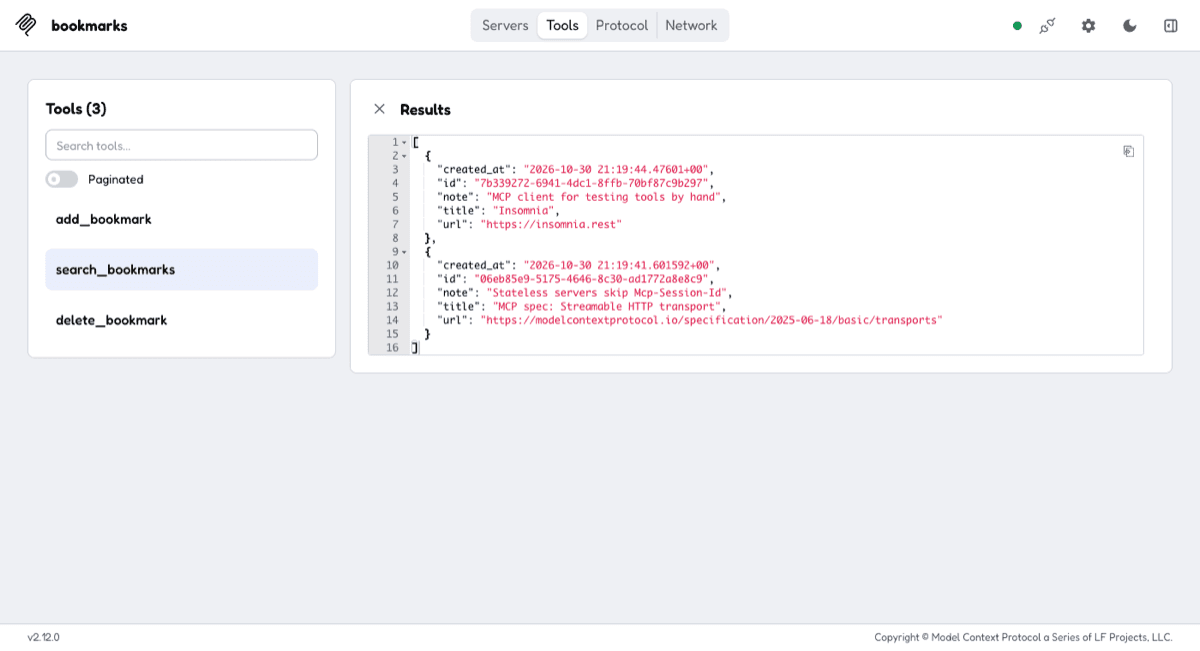
add_bookmark, fill inurlandtitleon the Params tab, and send it. The response pane shows the saved row with itsid.search_bookmarkswith an emptyqueryreturns it.
Without the token, the server answers 401. An ftp:// URL gets an input validation error and saves nothing.
To use it from Claude Code:
claude mcp add --transport http bookmarks https://<function-id>.functions.volcano.run/ \
  --header "Authorization: Bearer $MCP_TOKEN"
Then ask it to "save https://modelcontextprotocol.io as MCP" and it calls add_bookmark.
Why it's built this way
Most of this recipe isn't MCP. The SDK's stateless transport was the easy part in every run. The work was what any public endpoint needs: a token checked first, input limits in two places, and a database key no client sees. The one Volcano-specific trap was the database client: Codex's run and the hand-built reference both hit "No active session" with the service key passed as anonKey alone, and Codex read the SDK's source to find accessToken.
- Stateless, because a function keeps nothing between invocations. Sessions and server-initiated messages need a long-running process: an Express app on Fly.io or Render, or a Cloudflare Worker with a Durable Object.
- One shared bearer token: anyone holding it can add and delete. For per-user access, MCP's OAuth flow is the standard answer, and it's more work.
- Volcano's per-function request limits apply (plans and limits); the function adds none of its own. A request without the token costs one short invocation and never reaches the database.
- After changing
MCP_TOKEN, runvolcano cloud deployagain. A running function can keep the old value for several minutes aftervolcano cloud variables deployalone. - Cost: the Claude Code run was $1.47. Each tool call is one function invocation and one or two database statements, with no model calls.