
Notes app with per-user data
A Next.js notes app on Volcano where each person only sees their own notes, enforced in the database with row-level security.
Tested on Volcano CLI 0.54.0, SDK 2.2.0, Node 24.9.0, next 16.4.3, react 19.3.1; last verified 2026-10-29 on CLI 0.54.0.
What it does
A notes app where people sign up with an email and password, and each person only ever sees their own notes. The rule lives in the database, not in the app code, so a bug in a page can't show one person's notes to another.
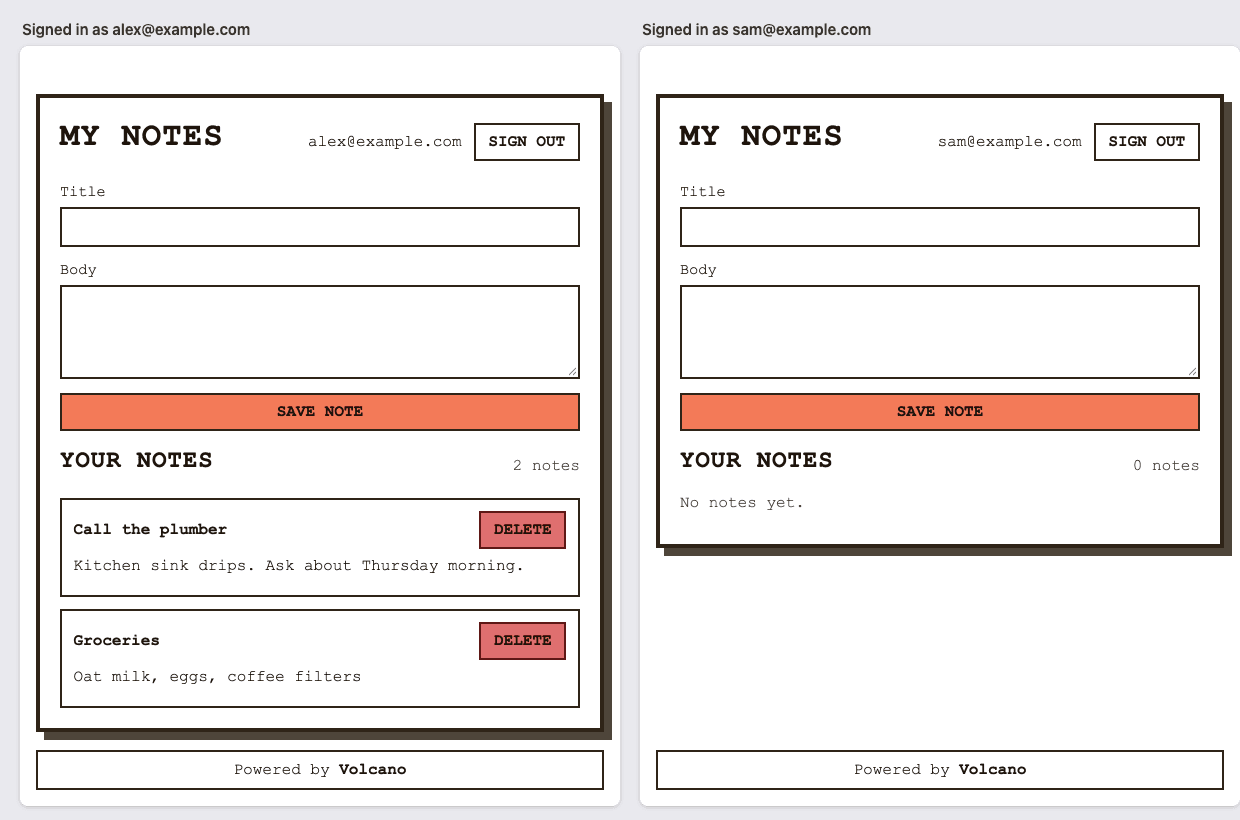

Try the live demo. Its notes are wiped every day.
What you need
- A Volcano account. Tested on SUPERAGENT. Everything this app uses (email and password sign-in, one database, one frontend, no functions) is also on HOBBY according to the plans and limits page.
- Claude Code, Codex or Cursor with the Volcano skills (
volcano setup).
New Volcano projects start with email sending and confirmation off, so anyone can sign up with any address. That's fine for a demo or an internal tool. For a real app, add an email provider and turn confirmation on (see the last section).
Build it with your coding agent
Paste this into Claude Code, Codex or Cursor in an empty folder:
Build a small notes app in this empty folder with Next.js and deploy it to Volcano.

- People sign up and sign in with email and password, and can sign out.
- A signed-in person can add a note (title and body), see their notes, and delete them.
- Each person only ever sees their own notes. Keep notes in a Postgres table on Volcano with row-level security, so the database refuses to show or change another person's notes even if the app code has a bug.
- Show the project's password rules on the sign-up form. If the project requires email confirmation, tell the person to check their email after sign-up instead of showing an error.
- Only the anon key goes to the browser. No service keys or platform tokens in frontend code.

Create a new Volcano project named notes-app, deploy to production and give me the URL. Before you finish, test the live app with two throwaway users: user B must not be able to read, change or delete user A's notes, through the app or through the database REST API with B's token.
Tested with Claude Code 2.1.312 (claude-opus-5-5) and Codex CLI 0.163.0 (gpt-6.1-sol), each with Volcano plugin 0.2.46. Both worked on the first try and passed the two-user check. Claude Code took 7 minutes and $1.25. It added the password rules and the "check your email" message, deployed, and ran the two-user test. Codex took 16 minutes and wrote a single RLS policy covering all four operations.
Build it yourself
Row-level security (RLS) is a Postgres feature: every query on the table is filtered by a rule you write once. Here the rule is "the row's user_id is the signed-in user." Volcano puts the user's id in auth.uid(). The table fills user_id in on insert, so the app never sends it:
CREATE TABLE IF NOT EXISTS notes (
    id UUID PRIMARY KEY DEFAULT gen_random_uuid(),
    user_id UUID NOT NULL DEFAULT auth.uid(),
    title TEXT NOT NULL,
    content TEXT NOT NULL DEFAULT '',
    created_at TIMESTAMPTZ NOT NULL DEFAULT NOW(),
    updated_at TIMESTAMPTZ NOT NULL DEFAULT NOW()
);
ALTER TABLE notes ENABLE ROW LEVEL SECURITY;
GRANT SELECT, INSERT, UPDATE, DELETE ON notes TO authenticated;
DROP POLICY IF EXISTS notes_select_own ON notes;
CREATE POLICY notes_select_own ON notes FOR SELECT USING (user_id = auth.uid());
DROP POLICY IF EXISTS notes_insert_own ON notes;
CREATE POLICY notes_insert_own ON notes FOR INSERT WITH CHECK (user_id = auth.uid());
DROP POLICY IF EXISTS notes_update_own ON notes;
CREATE POLICY notes_update_own ON notes FOR UPDATE USING (user_id = auth.uid()) WITH CHECK (user_id = auth.uid());
DROP POLICY IF EXISTS notes_delete_own ON notes;
CREATE POLICY notes_delete_own ON notes FOR DELETE USING (user_id = auth.uid());
Each statement goes in its own numbered file under volcano/migrations/ (for example 005_notes_policy_select_own_drop.sql, then 006_notes_policy_select_own_create.sql), since Volcano runs one statement per migration and runs them in order. --with-migrations runs every file again on each deploy, so each CREATE POLICY has a DROP POLICY IF EXISTS before it and redeploys don't fail. The browser asks for all notes and gets only its own:
const { data } = await volcano.from("notes").select("id,title,content,created_at").order("created_at", { ascending: false });
await volcano.insert("notes", { title, content });
To build it by hand from the example:
volcano init nextjs --example notes
npm install
volcano projects create notes-app
volcano use <project-id>
volcano cloud databases create app --region us-east-1 --pg-version 16
volcano projects keys anon list
# volcano/cloud.env: NEXT_PUBLIC_VOLCANO_API_URL, NEXT_PUBLIC_VOLCANO_ANON_KEY, NEXT_PUBLIC_VOLCANO_DATABASE=app
volcano cloud deploy --env-file volcano/cloud.env --with-migrations -d app
In volcano/volcano-config.yaml, scope the frontend to those three variables (variable_scope: scoped) so the build never sees a service key.
Check that it works
Open the URL in a normal window and a private window. Create an account in each with a made-up address like a@example.com. The default password rule is at least 15 characters, and the form shows it. Add a note as the first user. The second user should see "No notes yet."
To check the database and not just the page, call POST /databases/app/query/select with {"table": "notes"} and the second user's token. You should get an empty list, and an update or delete aimed at the first user's note id should change 0 rows.
Why it's built this way
When a coding agent builds your app, the code changes every time you ask for something new, and every change is a chance to drop the user_id filter from a query. A policy on the table doesn't change with the code. Every request passes through it, so it's the one place where "people only see their own notes" gets written once and stays true. That's also why the prompt makes the agent test with two users before it finishes. The agent wrote the rule, so it should show the rule holds.
-
No server code. The browser talks to the database with the user's own token, and RLS decides what it can see. The same check in a server route also works, but then it's only as good as every route that touches the table.
-
Confirmation stays off because that's the default and turning it on needs mail delivery. Without email enabled it fails with "require_email_confirmation cannot be enabled when email_enabled is false". With an SMTP provider (SendGrid, SES, Mailgun or similar) set up, it's two settings:
auth:
  email:
    enabled: true          # plus your SMTP host, port, username, password and from address
  email_verification:
    require_confirmation: true
The sign-up form already handles
confirmationRequired, so nothing in the app changes. See Email SMTP configuration. -
Cost: the Claude Code run was $1.25. The deploy used 152 build seconds and 7.8 MB of database storage, inside HOBBY's monthly allowances.
Build a Pixelboard
Create a shared pixel canvas with anonymous sign-in, persistent colors, and live updates using Volcano.
Petstore API from its OpenAPI spec
Turn the Swagger Petstore OpenAPI spec into a live API on Postgres, with public reads, signed-in writes and row-level security, then test it in Insomnia.