
Ecommerce store
A Next.js store on Volcano with a public catalog, carts in Postgres, and a function that prices each order and takes the stock in one transaction.
Tested on Volcano CLI 0.66.0, SDK 2.2.0, Node 26.11.1, next 16.4.5, react 19.3.1, pg 8.23.1; last verified 2026-11-05 on CLI 0.66.0.
What it does
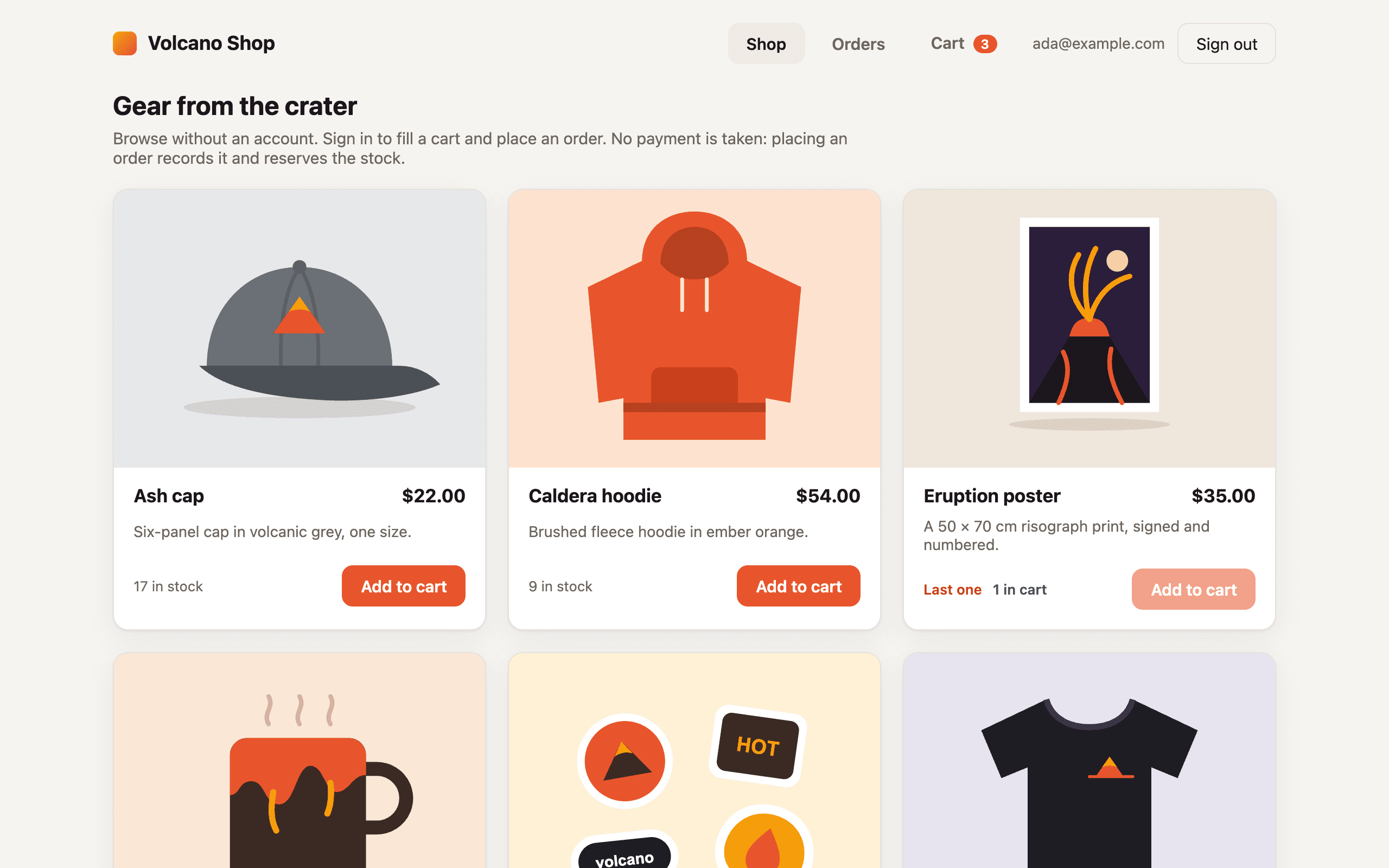
A small store. Anyone can browse the products and see what's in stock without an account. Shoppers sign up with an email and password, fill a cart that's saved in Postgres, and place orders. Each shopper sees only their own cart and order history.
Placing an order runs in a Volcano function, in one database transaction. The function reads the cart and the prices from the database, takes the stock, records the order and empties the cart. The browser never sends a price or a total, and the database won't let stock go below zero, so two shoppers can't both buy the last unit.
There's no payment provider. Placing an order records it and reserves the stock, and nothing is charged. Why it's built this way shows where a payment step would go.
What you need
- A Volcano account. Tested on SUPERAGENT. The app uses email and password sign-in, one database, two functions and one frontend with a function route. No third-party services.
- Claude Code, Codex or Cursor with the Volcano skills (
volcano setup), or Node.js 24+ and the Volcano CLI to build it yourself.
New Volcano projects start with email confirmation off, so anyone can sign up with any address. See Notes app with per-user data for turning it on.
Build it with your coding agent
Paste this into Claude Code, Codex or Cursor in an empty folder:
Build a small online store in this empty folder with Next.js and deploy it to Volcano.

- Anyone can browse the products without signing in. Seed six products with
  prices, stock counts and images.
- Shoppers sign up with email and password, keep a cart that survives a reload,
  and place orders. No payment provider: placing an order just records it.
- Place each order in a Volcano function, in one transaction: work out the total
  from the prices in the database, take the stock, record the order and empty the
  cart. Never trust a price or total sent from the browser.
- Enforce stock in the database, so two shoppers can't both buy the last unit.
- Keep carts and orders in Postgres with row-level security: each shopper sees
  only their own, and only the function can create orders or change stock.
- Only the anon key goes to the browser, with no more permissions than it needs.

Create a new Volcano project named volcano-shop, deploy to production and give me
the URL. Before you finish, test the live project with two throwaway shoppers:
browsing works signed out; A places an order and sees it; B can't read A's orders;
a forged price or total is ignored or refused; and when A and B order the last
unit at the same time, only one succeeds.
Tested with a fresh Claude Code agent (claude-opus-5-5) in an empty folder. It had only this prompt, Volcano CLI 0.66.0, volcano docs and a few notes about the test machine, without the Volcano plugin, and the project was renamed so it didn't collide with an existing one. It deployed on the first try and finished in about 15 minutes. Its test against the live project reported 28 passing checks and passed all 28 again when re-run by hand afterwards. They covered signed-out browsing, forged prices and totals ignored, B unable to read or change A's orders and cart, writes refused unless they go through the function, and three rounds of simultaneous orders for the last unit, each with one 201 and one 409. It served the catalog through a same-origin function route, so the browser key needs no function permissions. This recipe now does the same. It also trimmed the key to sign-up, sign-in, refresh and sign-out, which meant calling the anon key API with a project access token, because the CLI only makes keys with every Auth permission.
Build it yourself
Scaffold a Next.js project and add a database:
volcano init nextjs
npm install
volcano login
volcano projects create volcano-shop
volcano use volcano-shop
volcano cloud databases create shop --region us-east-1 --pg-version 16
volcano init nextjs puts package.json at the root, the app in web/, and the migrations in volcano/migrations/. It also writes .volcano/source-layout.json, which tells volcano cloud deploy where the app is.
Tables and row-level security
Four tables: products, cart_items, orders and order_items. Volcano runs each migration file as one query, so every statement below goes in its own numbered file, from 001_create_products.sql to 021_products_seed.sql. Each one is safe to re-run: IF NOT EXISTS, a DROP POLICY IF EXISTS file before each CREATE POLICY file, and ON CONFLICT DO NOTHING for the seed.
CREATE TABLE IF NOT EXISTS public.products (
  id text PRIMARY KEY CHECK (id ~ '^[a-z0-9-]{1,40}$'),
  name text NOT NULL CHECK (char_length(name) BETWEEN 1 AND 80),
  description text NOT NULL DEFAULT '' CHECK (char_length(description) <= 280),
  price_cents integer NOT NULL CHECK (price_cents > 0),
  stock integer NOT NULL CHECK (stock >= 0),
  image_path text NOT NULL,
  active boolean NOT NULL DEFAULT true,
  created_at timestamptz NOT NULL DEFAULT now()
);
CREATE TABLE IF NOT EXISTS public.cart_items (
  user_id uuid NOT NULL DEFAULT auth.uid(),
  product_id text NOT NULL REFERENCES public.products(id),
  quantity integer NOT NULL CHECK (quantity BETWEEN 1 AND 10),
  PRIMARY KEY (user_id, product_id)
);
CREATE TABLE IF NOT EXISTS public.orders (
  id uuid PRIMARY KEY DEFAULT gen_random_uuid(),
  user_id uuid NOT NULL,
  total_cents integer NOT NULL CHECK (total_cents > 0),
  status text NOT NULL DEFAULT 'placed' CHECK (status IN ('placed')),
  created_at timestamptz NOT NULL DEFAULT now()
);
CREATE TABLE IF NOT EXISTS public.order_items (
  order_id uuid NOT NULL REFERENCES public.orders(id),
  user_id uuid NOT NULL,
  product_id text NOT NULL REFERENCES public.products(id),
  product_name text NOT NULL,
  unit_price_cents integer NOT NULL CHECK (unit_price_cents > 0),
  quantity integer NOT NULL CHECK (quantity BETWEEN 1 AND 10),
  PRIMARY KEY (order_id, product_id)
);
CREATE INDEX IF NOT EXISTS orders_user_created_idx ON public.orders (user_id, created_at DESC);
ALTER TABLE public.products ENABLE ROW LEVEL SECURITY;
ALTER TABLE public.cart_items ENABLE ROW LEVEL SECURITY;
ALTER TABLE public.orders ENABLE ROW LEVEL SECURITY;
ALTER TABLE public.order_items ENABLE ROW LEVEL SECURITY;
REVOKE ALL ON public.products, public.cart_items, public.orders, public.order_items
  FROM PUBLIC, anon, authenticated;
GRANT SELECT, DELETE ON public.cart_items TO authenticated;
GRANT INSERT (product_id, quantity) ON public.cart_items TO authenticated;
GRANT UPDATE (quantity) ON public.cart_items TO authenticated;
GRANT SELECT ON public.orders, public.order_items TO authenticated;
DROP POLICY IF EXISTS cart_items_own ON public.cart_items;
CREATE POLICY cart_items_own ON public.cart_items FOR ALL TO authenticated
  USING (user_id = auth.uid()) WITH CHECK (user_id = auth.uid());
DROP POLICY IF EXISTS orders_read_own ON public.orders;
CREATE POLICY orders_read_own ON public.orders FOR SELECT TO authenticated
  USING (user_id = auth.uid());
DROP POLICY IF EXISTS order_items_read_own ON public.order_items;
CREATE POLICY order_items_read_own ON public.order_items FOR SELECT TO authenticated
  USING (user_id = auth.uid());
INSERT INTO public.products (id, name, description, price_cents, stock, image_path) VALUES
  ('lava-mug', 'Lava mug', 'A 12 oz stoneware mug with a glaze that runs like a lava flow.', 1800, 25, '/products/lava-mug.svg'),
  ('obsidian-tee', 'Obsidian tee', 'Heavyweight black cotton tee with a small caldera on the chest.', 2600, 40, '/products/obsidian-tee.svg'),
  ('caldera-hoodie', 'Caldera hoodie', 'Brushed fleece hoodie in ember orange.', 5400, 12, '/products/caldera-hoodie.svg'),
  ('magma-stickers', 'Magma sticker pack', 'Six vinyl stickers for laptops and water bottles.', 600, 100, '/products/magma-stickers.svg'),
  ('ash-cap', 'Ash cap', 'Six-panel cap in volcanic grey, one size.', 2200, 18, '/products/ash-cap.svg'),
  ('eruption-poster', 'Eruption poster', 'A 50 × 70 cm risograph print, signed and numbered.', 3500, 1, '/products/eruption-poster.svg')
ON CONFLICT (id) DO NOTHING;
What a signed-in shopper can do through the database API:
- Cart: read, add, change the quantity of and remove their own rows. The column grants leave out
user_id, so the database fills it in from the session, and the cart has no price column to tamper with. - Orders: read their own, and nothing else. There's no
INSERT,UPDATEorDELETEgrant onordersororder_items. - Products: nothing. RLS is on with no grants, so the only way in is the
catalogfunction below.
CHECK (stock >= 0) is the last line of defence: whatever code runs, a row with negative stock can't be written. Product images are static SVGs in web/public/products/. To manage them from a dashboard instead, put them in a public storage bucket and store the file path in image_path.
Two functions with a database connection
The database API only answers signed-in users and service keys, so signed-out browsing goes through a function, and so does anything the browser mustn't do itself. Both functions connect with the database's full-access connection string, which bypasses RLS, so each one decides what it reads and writes.
Get the connection string with volcano cloud databases get shop --show-connection-string, and give each function its own package.json with pg in it. The function's directory name becomes its name:
volcano/functions/catalog/index.js
volcano/functions/catalog/package.json
volcano/functions/place-order/index.js
volcano/functions/place-order/package.json
catalog lists the active products and reads nothing else. It's a public function in HTTP mode, and a Frontend Function route serves it on the store's own origin at /api/products, so the page fetches it like any URL, with no key and no session:
const { Pool } = require('pg');

const pool = new Pool({ connectionString: process.env.DATABASE_URL, max: 3 });

function reply(statusCode, body) {
  return { statusCode, headers: { 'Content-Type': 'application/json' }, body: JSON.stringify(body) };
}

exports.handler = async (event) => {
  if (event.method !== 'GET' && event.method !== 'HEAD') {
    return reply(405, { error: 'Use GET.' });
  }
  try {
    const { rows } = await pool.query(
      `SELECT id, name, description, price_cents, stock, image_path
         FROM public.products WHERE active ORDER BY created_at, id`,
    );
    return reply(200, { products: rows });
  } catch (error) {
    console.error('catalog failed', error);
    return reply(500, { error: 'Could not load the catalog.' });
  }
};
Volcano adds Cache-Control: private, no-store to every routed response, so the stock shown is never a cached copy.
place-order is authenticated. It takes the shopper from event.__volcano_auth, which Volcano fills in from the access token, and the items from the shopper's saved cart. Anything else in the payload is ignored:
const { Pool } = require('pg');

const pool = new Pool({ connectionString: process.env.DATABASE_URL, max: 5 });

function reply(statusCode, body) {
  return {
    statusCode,
    headers: { 'Content-Type': 'application/json', 'Cache-Control': 'no-store' },
    body: JSON.stringify(body),
  };
}

exports.handler = async (event) => {
  const auth = event.__volcano_auth;
  if (!auth || auth.role !== 'authenticated') {
    return reply(401, { error: 'Sign in to place an order.' });
  }

  const client = await pool.connect();
  let broken = false;
  try {
    await client.query('BEGIN');

    // Locking the cart makes a double-click wait for the first order, which
    // then empties the cart, so the second attempt finds nothing to buy.
    const { rows: cart } = await client.query(
      `SELECT product_id, quantity FROM public.cart_items
        WHERE user_id = $1 ORDER BY product_id FOR UPDATE`,
      [auth.user_id],
    );
    if (cart.length === 0) {
      await client.query('ROLLBACK');
      return reply(400, { error: 'Your cart is empty.' });
    }

    // Take the stock and read the price in one statement per product. Rows are
    // locked in product id order, so two orders can't deadlock, and a second
    // order for the last unit waits here, then matches no row.
    const items = [];
    for (const { product_id, quantity } of cart) {
      const { rows } = await client.query(
        `UPDATE public.products SET stock = stock - $2
          WHERE id = $1 AND active AND stock >= $2
          RETURNING id, name, price_cents`,
        [product_id, quantity],
      );
      if (rows.length === 0) {
        await client.query('ROLLBACK');
        const { rows: left } = await client.query(
          'SELECT name, stock FROM public.products WHERE id = $1 AND active',
          [product_id],
        );
        let message = 'An item in your cart is no longer sold. Remove it and try again.';
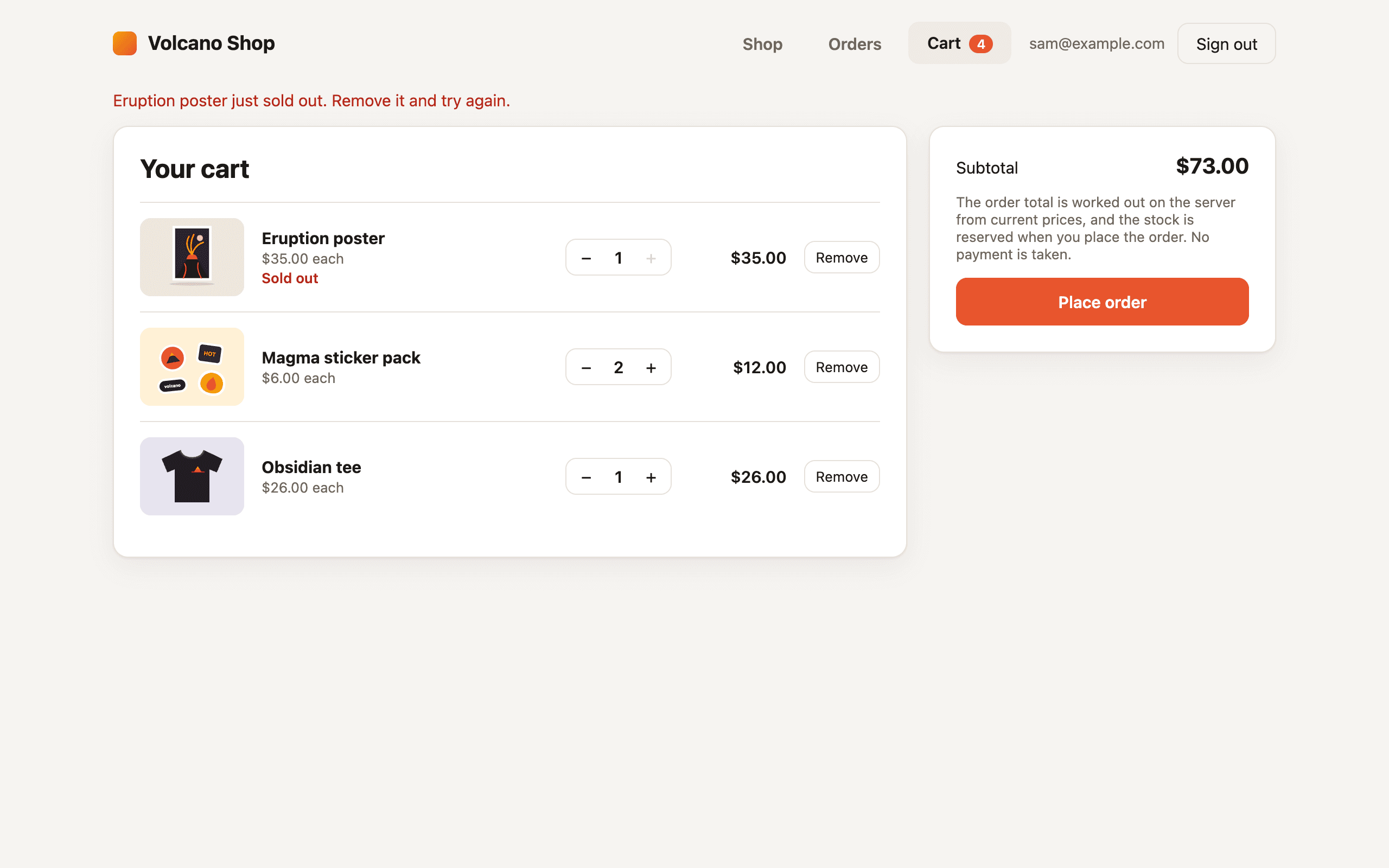
        if (left[0]?.stock === 0) message = `${left[0].name} just sold out. Remove it and try again.`;
        else if (left.length) message = `Only ${left[0].stock} × ${left[0].name} left. Update your cart and try again.`;
        return reply(409, { error: message, product_id, available: left[0]?.stock ?? 0 });
      }
      items.push({ ...rows[0], quantity });
    }

    const total = items.reduce((sum, item) => sum + item.price_cents * item.quantity, 0);

    // No payment is taken. A charge can't be rolled back with this
    // transaction, so a payment provider goes after COMMIT (see below).
    const { rows: [order] } = await client.query(
      `INSERT INTO public.orders (user_id, total_cents) VALUES ($1, $2)
       RETURNING id, total_cents, status, created_at`,
      [auth.user_id, total],
    );
    await client.query(
      `INSERT INTO public.order_items
         (order_id, user_id, product_id, product_name, unit_price_cents, quantity)
       SELECT $1, $2, i.id, i.name, i.price_cents, i.quantity
         FROM jsonb_to_recordset($3::jsonb) AS i(id text, name text, price_cents int, quantity int)`,
      [order.id, auth.user_id, JSON.stringify(items)],
    );
    // Remove only what was bought: a row another tab added after the cart was
    // read isn't locked or priced, so it stays for the next order.
    await client.query(
      'DELETE FROM public.cart_items WHERE user_id = $1 AND product_id = ANY($2::text[])',
      [auth.user_id, cart.map((line) => line.product_id)],
    );
    await client.query('COMMIT');

    return reply(201, {
      order: {
        ...order,
        items: items.map((item) => ({
          product_id: item.id,
          product_name: item.name,
          unit_price_cents: item.price_cents,
          quantity: item.quantity,
        })),
      },
    });
  } catch (error) {
    // A connection that can't roll back is dropped from the pool, not reused.
    await client.query('ROLLBACK').catch(() => { broken = true; });
    console.error('place-order failed', error);
    return reply(500, { error: 'Could not place the order.' });
  } finally {
    client.release(broken);
  }
};
Each order keeps a copy of the product name and the price it was bought at in order_items, so changing a price later doesn't rewrite order history.
The browser key
The browser only signs people in. The catalog comes through the route, the cart and orders through the database API with the shopper's token, and place-order with the shopper's token too. So the auth-only key every new project starts with is enough, and volcano projects keys anon list shows it. With no functions.invoke permission, the key on its own can't call either function. A request with only the key gets 403 anon key does not have functions.invoke permission.
The default key also carries password reset and email confirmation. To drop those, create a key with only auth.signup, auth.signin, auth.refresh and auth.logout in the dashboard's anonymous keys page or through the anon key API.
Browse, fill the cart and check out
Create one client for the page and restore the session before showing the cart:
import { VolcanoClient } from '@volcano.dev/sdk';

const volcano = new VolcanoClient({
  apiUrl: process.env.NEXT_PUBLIC_VOLCANO_API_URL,
  anonKey: process.env.NEXT_PUBLIC_VOLCANO_ANON_KEY,
});
volcano.database(process.env.NEXT_PUBLIC_VOLCANO_DATABASE);
const { user } = await volcano.initialize(); // null until someone signs in
Load the catalog from the route. For place-order, functions.invoke() sends the shopper's token. Its error only covers calls that never reached the function, such as a 404 for a function the caller isn't allowed to see. A 400 or 409 from the function itself comes back as status, with the JSON body in data:
async function loadCatalog() {
  const response = await fetch('/api/products', { cache: 'no-store' });
  const data = await response.json().catch(() => ({}));
  if (!response.ok) throw new Error(data.error || 'Could not load the catalog.');
  return data.products;
}

async function placeOrder() {
  const { data, status, error } = await volcano.functions.invoke('place-order');
  if (error) throw new Error(error.message || 'Could not place the order.');
  if (status >= 400) throw new Error(data?.error || 'Could not place the order.');
  return data.order;
}
The cart is ordinary RLS-guarded rows. The SDK has no upsert, so set a quantity by updating first and inserting when nothing matched. If another tab inserted the same product in between, the primary key refuses the insert, so update again:
async function setCartQuantity(productId, quantity) {
  if (quantity <= 0) {
    const { error } = await volcano.delete('cart_items').eq('product_id', productId);
    if (error) throw error;
    return;
  }
  const updated = await volcano.update('cart_items', { quantity }).eq('product_id', productId);
  if (updated.error) throw updated.error;
  if (updated.data.length > 0) return;
  const inserted = await volcano.insert('cart_items', { product_id: productId, quantity });
  if (!inserted.error) return;
  if (!/23505|duplicate key/.test(inserted.error.message)) throw inserted.error;
  const retried = await volcano.update('cart_items', { quantity }).eq('product_id', productId);
  if (retried.error) throw retried.error;
}
Each write is a round trip of a few hundred milliseconds, so update the page straight away and run the writes one at a time, in a promise chain. Otherwise two fast clicks on + can land out of order and leave the older quantity saved. Wait for that chain before calling place-order, so the function sees the cart the shopper sees. After a 409, reload the cart and the catalog to show the new stock.
Read the order history with the shopper's own token. RLS returns only their rows:
async function loadOrders() {
  const orders = await volcano.from('orders').select('id,total_cents,status,created_at')
    .order('created_at', { ascending: false }).limit(20);
  if (orders.error) throw orders.error;
  if (orders.data.length === 0) return [];
  const items = await volcano.from('order_items')
    .select('order_id,product_id,product_name,unit_price_cents,quantity')
    .in('order_id', orders.data.map((order) => order.id));
  if (items.error) throw items.error;
  return orders.data.map((order) => ({
    ...order,
    items: items.data.filter((item) => item.order_id === order.id),
  }));
}
The cart page can show a subtotal from the catalog prices, but label it as an estimate. The total that counts is the one place-order returns.
Configure and deploy
Save volcano/volcano-config.yaml. It sets each function's visibility, puts catalog in HTTP mode behind the route, gives both functions DATABASE_URL and nothing else, and keeps it out of the frontend:
version: 1
auth:
  signup:
    enable_signup: true
    enable_anonymous_signins: false
  cors:
    enabled: true
    allowed_origins:
      - http://localhost:3000
functions:
  - name: catalog
    visibility: public
    invocation_mode: http
    variable_scope: scoped
    variables:
      - DATABASE_URL
  - name: place-order
    visibility: authenticated
    variable_scope: scoped
    variables:
      - DATABASE_URL
frontends:
  - name: web
    variable_scope: scoped
    variables:
      - NEXT_PUBLIC_VOLCANO_API_URL
      - NEXT_PUBLIC_VOLCANO_ANON_KEY
      - NEXT_PUBLIC_VOLCANO_DATABASE
    function_routes:
      - function: catalog
        path_prefix: /api/products
        strip_prefix: true
Anonymous sign-ins stay off. authenticated functions admit anonymous sessions too, which is why place-order also checks auth.role.
Put the four variables in volcano/cloud.env, and the three NEXT_PUBLIC_ ones in web/.env.local for npm run dev. Both paths are gitignored:
NEXT_PUBLIC_VOLCANO_API_URL=https://api.volcano.dev
NEXT_PUBLIC_VOLCANO_ANON_KEY=ak-your-project-key
NEXT_PUBLIC_VOLCANO_DATABASE=shop
DATABASE_URL=postgresql://your-connection-string
Deploy everything in one command:
volcano cloud deploy --env-file volcano/cloud.env --with-migrations -d shopIt saves the variables, runs the migrations, deploys the functions, builds the frontend and applies the manifest, then prints the frontend URL. The deploy creates the functions as private, and the manifest then sets their visibility and mode and adds the route, so everything works once the command finishes. Add the frontend's HTTPS origin to auth.cors.allowed_origins and run the same command again. See CORS configuration.
npm run dev serves the app without the route. To browse locally, add a web/next.config.mjs that forwards the path to the deployed site (volcano init nextjs doesn't create one), and set CATALOG_ORIGIN to the frontend URL in web/.env.local:
const nextConfig = {
  async rewrites() {
    if (!process.env.CATALOG_ORIGIN) return [];
    return [{ source: '/api/products', destination: `${process.env.CATALOG_ORIGIN}/api/products` }];
  },
};

export default nextConfig;
Check that it works
Open the URL signed out: the products load, and each button says Sign in to buy. Create an account with a made-up address (the default password rule is at least 15 characters), add a few things to the cart and reload. The cart is still there. Place the order. It appears under Orders with the total the server worked out, and the stock on the shop page goes down.
To check the last unit, sign up a second account in a private window, put the item with one unit left in both carts, and place both orders. The first succeeds. The second gets "… just sold out", and the item shows as sold out in its cart.
To check the rules and not just the page, write a Node script that signs up two shoppers against the live project with the same SDK calls. Give it the connection string too, so it can add two throwaway products before the test (one of them with a single unit) and remove them and their orders afterwards. For the signed-out database check, call the API with only the anon key, because the SDK refuses before sending anything when nobody is signed in. In testing, that script passed all 21 checks:
PASS a signed-out visitor can browse the catalog — 200, 8 products
PASS the anon key alone can't invoke functions — 403 anon key does not have functions.invoke permission
PASS a signed-out visitor can't place an order — 403 anon key does not have functions.invoke permission
PASS a signed-out visitor can't read orders — 401 {"error":"Invalid or expired token"}
PASS two distinct signed-in shoppers
PASS A places an order — 201 596cdb5d-ec24-4957-b4b7-f51f4ffbd146
PASS the forged price and total are ignored — total 2500, unit 1250
PASS the order took the stock — stock 3
PASS placing the order emptied A's cart
PASS a second click finds an empty cart — 400 Your cart is empty.
PASS A sees the order and its items
PASS B can't read A's order — 0 rows
PASS B can't read A's order items — 0 rows
PASS A can't insert an order directly — Query failed: ERROR: permission denied for table orders (SQLSTATE 42501)
PASS A can't change an order total — Query failed: ERROR: permission denied for table orders (SQLSTATE 42501)
PASS A can't change a price — Query failed: ERROR: permission denied for table products (SQLSTATE 42501)
PASS a cart row can't carry a price — Query failed: ERROR: column "price_cents" of relation "cart_items" does not exist (SQLSTATE 42703)
PASS A can't add to B's cart — Query failed: ERROR: permission denied for table cart_items (SQLSTATE 42501)
PASS two orders for the last unit: one succeeds, one is refused — 409 Smoke last unit just sold out. Remove it and try again.
PASS the last unit was sold once and stock is 0 — sold 1
PASS the database refuses negative stock — new row for relation "products" violates check constraint "products_stock_check"
A forged price or total sent with the order is simply ignored, because the function never reads one from the payload. A run in headless Chrome also passed: signed-out browsing, sign-up, a cart that survived a reload, checkout, the order history, and the sold-out message for the second shopper, with no errors in the console apart from the expected 409. In testing, the first catalog request took about half a second and later ones about 75 milliseconds. A shopper's first place-order took about 2.7 seconds, most of it looking up the function and opening connections, and later orders about 200 milliseconds. Cart and order reads took 100 to 300 milliseconds.
Why it's built this way
- The server prices the order.
place-orderreads the cart and the prices from the database inside the transaction, so the total depends only on what's stored. The browser's subtotal is a preview. The payload carries nothing the function reads, so there's nothing to forge. - One transaction, one statement per product.
UPDATE … SET stock = stock - $2 WHERE stock >= $2checks and takes the stock in one step, and the row lock makes a second order for the same product wait until the first commits. It then matches no row, the function rolls back and answers409. Locking rows in product id order means two orders for overlapping items can't deadlock.CHECK (stock >= 0)backs this up if other code ever writes stock. - The cart is in the database, not the request. The function buys exactly the rows it locked, and removing them in the same transaction makes a double-click or a retried request harmless: the second call finds an empty cart and gets
400. A product added from another tab while the order is being placed isn't locked or priced, so it stays in the cart for next time. In testing, an item added while checkout was held up by a locked product row was still in the cart afterwards. Carts also follow the shopper across devices. - A full-access connection in the function, RLS for the browser. The browser and the functions reach the same tables, and any grant the function had through RLS, the browser would have too. So the function uses the full-access connection string, and the
authenticatedrole gets only what a shopper needs: their own cart, and read-only orders. The connection string is scoped to the two functions, and neither the frontend nor the browser ever sees it. - Browsing through a function route. The database API refuses requests that only carry the anon key, so signed-out browsing needs a server-side reader. A
publicfunction that returns only active products keeps the products table closed to everyone else. Serving it through a Frontend Function route keeps the browser key auth-only: invoking a function with the anon key would needfunctions.invoke, while the route needs no credential. Anyone can call the route, so it does nothing but read. - Where a payment provider goes. A charge can't be rolled back with a database transaction, so don't charge inside one. Instead, let
place-ordercommit the order aspendingwith the stock reserved (addpending,paidandcancelledto thestatuscheck). After the commit, create the payment, for example a Stripe PaymentIntent for the stored total, with the order id as its idempotency key and in its metadata, so a retry can't charge twice. Mark the orderpaidonly from the provider's webhook, handled by apublicfunction in HTTP mode withhttp_auth_mode: none. The default mode refuses requests that carry no Volcano credential, and a provider's webhook carries none, so the function's check of the provider's signature is the only gate. It then updates the order by that id. A scheduled function cancels orders that staypendingtoo long and returns their stock, after checking with the provider that nothing was paid. Keep the provider's secret key in a variable scoped to those functions only. - No admin, refunds or cancellations. Products are managed with SQL, orders can't be cancelled from the app, and stock only goes down. Add an admin role and functions for restocking, cancelling (which returns the stock in the same transaction) and refunds before running a real shop.
Photo sharing with Storage
A Next.js photo sharing app on Volcano with email sign-in, uploads to a storage bucket, browser-made thumbnails, and owner-only delete.
Notes app with per-user data
A Next.js notes app on Volcano where each person only sees their own notes, enforced in the database with row-level security.